Your outcome
What you will have at the end
Leave with one complete lesson: an observable objective, a worked example, a learner worksheet, a review rubric, and a plan to test the lesson with suitable learners.
Bring these starting materials
- One task you can perform and explain, with a clear example of what good work looks like.
- A description of the intended learner, their starting knowledge, and the situation in which they will use the skill.
- Fictional or de-identified practice inputs, plus reliable sources for any factual or product-specific instructions.
- A document editor, an AI assistant you can review, and a place to keep lesson drafts, visuals, and revision notes.
Choose a small, useful toolkit
One assistant and a clear review process are enough to begin. Add a tool only when the next task requires it. Software subscriptions and setup are separate from these free guides.
Plan and draft
Your preferred AI assistant
Organize your expertise, propose exercises, and critique unclear instructions. Supply examples and keep the instructional decisions with you.
Create the materials
A document editor; Figma when useful
Start with a readable worksheet and simple visual. Use a design tool when layout or annotation needs more control.
Teach and collect feedback
A shared lesson and a notes document
Start with an accessible format. Add a learning platform or recorded course when the tested experience needs those capabilities.
One example, carried through the process
Build along: turn customer notes into a testable offer
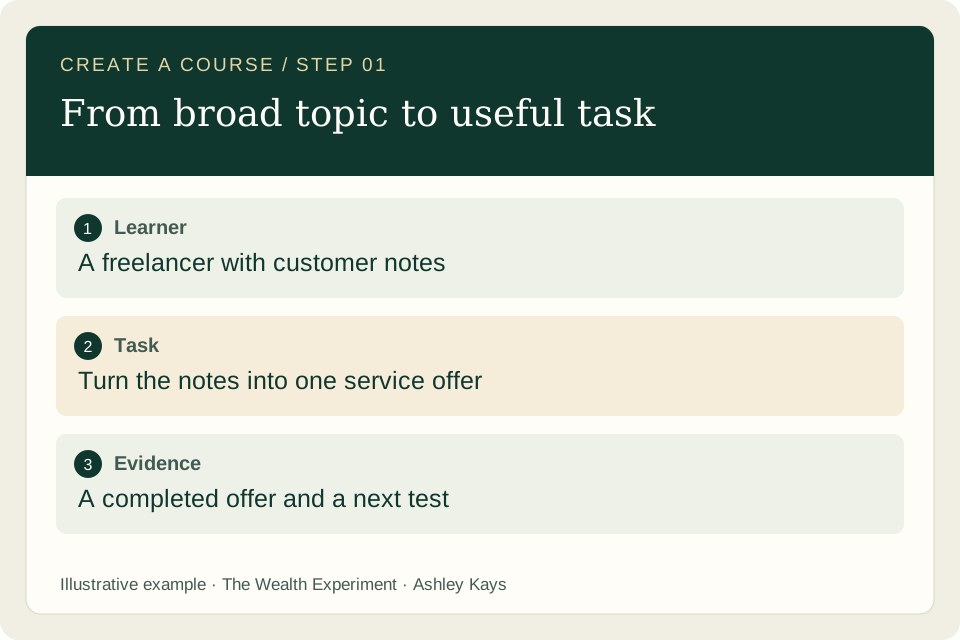
Our illustrative lesson helps a freelancer turn customer notes into a bounded service offer: identify a buyer, separate evidence from assumptions, describe a deliverable, and choose a test. The notes and responses are invented for teaching, not reported learner results. Adapt the method using your expertise and authorized material.
You can run these roles in one assistant or delegate them when your tools support it. These guides teach the process; reading or copying a prompt does not connect accounts or start an agent.
You + research assistant
Define the learner and outcome
Name what the learner will be able to do. That outcome guides the examples, prerequisites, and practice you include in the lesson.
What to do
- Describe one learner in a real situation: what they already know, what they are trying to do, and where they get stuck. Use conversations or observations when available; mark your guesses.
- Write an outcome that begins with an observable action, such as draft, compare, diagnose, or build. Name the output and the conditions under which the learner should produce it.
- Set the boundaries. List what the learner must bring, what the lesson teaches, and what belongs in a later lesson. Give the AI this brief before asking for a curriculum.
See what good work looks like
A task replaces a broad promise
Our sample learner is a freelancer who can deliver a service but struggles to turn scattered customer notes into a clear offer. The starting material is a fictional conversation note describing repeated proposal work and deadline pressure.
The outcome: given those notes, draft an offer with a specific buyer, a supported problem, a defined deliverable, exclusions, and one next customer test. The lesson covers offer design; pricing negotiation and sales automation can come later.
Copy the prompt for this step
Replace the bracketed details with your own project. Review what the assistant returns.
Act as an instructional designer. Use this learner description [learner] and task [task]. Propose one observable lesson outcome, prerequisites, the final learner artifact, and clear exclusions. Separate what my notes establish from assumptions. Identify questions I should ask a potential learner before developing the lesson.
Before you move on
- The outcome describes an action and an inspectable output.
- The example fits the learner's experience and context.
- Prerequisites and exclusions are explicit.
Keep this output: A learner brief and one outcome that can be checked against an actual piece of work.
If you get stuck: If the outcome says only “understand AI,” ask what the learner should be able to produce or decide afterward.
Curriculum assistant + you
Design backward from the task
Decide what acceptable work looks like before writing lessons. A shared rubric makes practice purposeful and feedback easier to apply.
What to do
- Create a small rubric for the final artifact. Describe the features of usable work in plain language, including the mistakes that would make the output difficult to apply.
- Break the task into teachable decisions. For each decision, specify what the learner sees, what they do, and what feedback helps them improve.
- Match every planned section to a rubric criterion. Move background material into optional reading if it does not help the learner complete or review the task.
See what good work looks like
A rubric for the offer worksheet
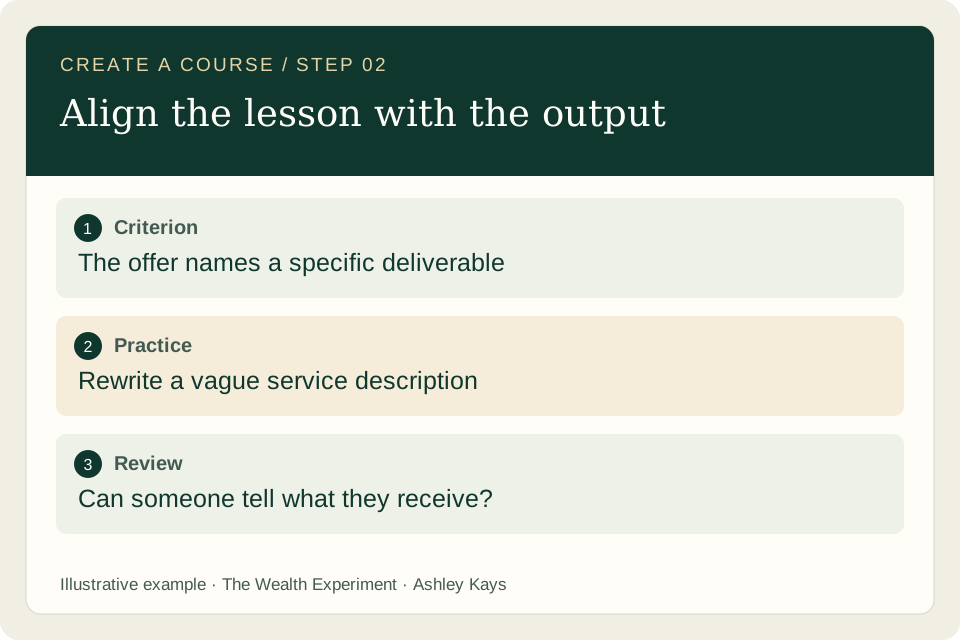
Review five things: a reachable buyer; a problem connected to the notes; a specific deliverable; useful boundaries; and a next test that could change the decision. Mark each “needs revision” or “usable,” with a reason.
“I help businesses with AI” needs revision because neither the buyer nor the deliverable is clear. “I prepare a proposal draft from an independent consultant's approved notes” is more specific, but the learner must still explain inputs, exclusions, and how they would test interest.
Copy the prompt for this step
Replace the bracketed details with your own project. Review what the assistant returns.
Build a plain-language rubric for this outcome [outcome]. Use five criteria, with descriptions of usable work and work needing revision. Map each criterion to one practice activity. Review my proposed lesson sections [outline] and identify sections that do not support the final task.
Before you move on
- Each criterion can be judged from the submitted work.
- The practice covers all required decisions.
- The learner can use the rubric without an instructor.
Keep this output: A review rubric and a short lesson sequence that prepares the learner to meet it.
If you get stuck: A list of topics is not a learning sequence. Put the learner's decisions in order, then add explanations where they are needed.
Research assistant + lesson writer
Research and storyboard
A storyboard makes the teaching visible before production. It reveals skipped decisions, assumed knowledge, and unsupported claims while the lesson is still easy to change.
What to do
- Collect the sources behind factual instructions. Record the page, relevant claim, and date checked. Verify changing tool instructions against official documentation and your own demonstration.
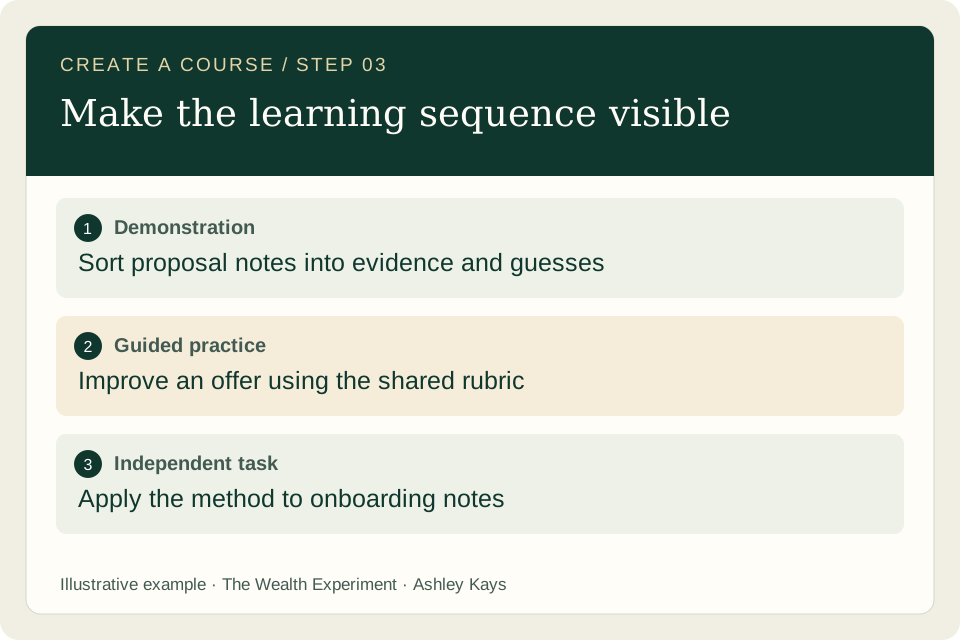
- Outline five parts: the problem, a worked demonstration, guided practice, an independent attempt, and review. Write what the learner does in each part.
- Prepare a different input for the independent attempt. Give the reviewer the storyboard and rubric together, then ask where learners may need an example or a clearer instruction.
See what good work looks like
Show the decision inside the demonstration
The fictional note says, “I rewrite the same proposal sections whenever a new prospect asks for details.” The demonstration highlights a repeated task, then marks willingness to pay as unknown. It turns the task into a proposed deliverable without inventing demand.
Guided practice asks learners to sort statements into evidence, assumptions, and questions. Independent practice uses a different fictional note about client onboarding. Learners must transfer the method instead of copying the instructor's proposal offer.
Copy the prompt for this step
Replace the bracketed details with your own project. Review what the assistant returns.
Storyboard this lesson using the outcome [outcome], rubric [rubric], and sources [sources]. Include a demonstration, guided practice, an independent example, and feedback instructions. Show the decisions inside the demonstration. Label fictional inputs and flag unsupported factual claims instead of filling the gaps.
Before you move on
- Every demonstration explains why a choice was made.
- Factual claims have an appropriate source.
- Independent practice requires applying the method again.
Keep this output: A teachable storyboard, a source log, and two distinct practice inputs.
If you get stuck: A polished script can hide a missing demonstration. Show the messy starting input and the choices that improve it.
Writer + designer + accessibility reviewer
Make the learning assets
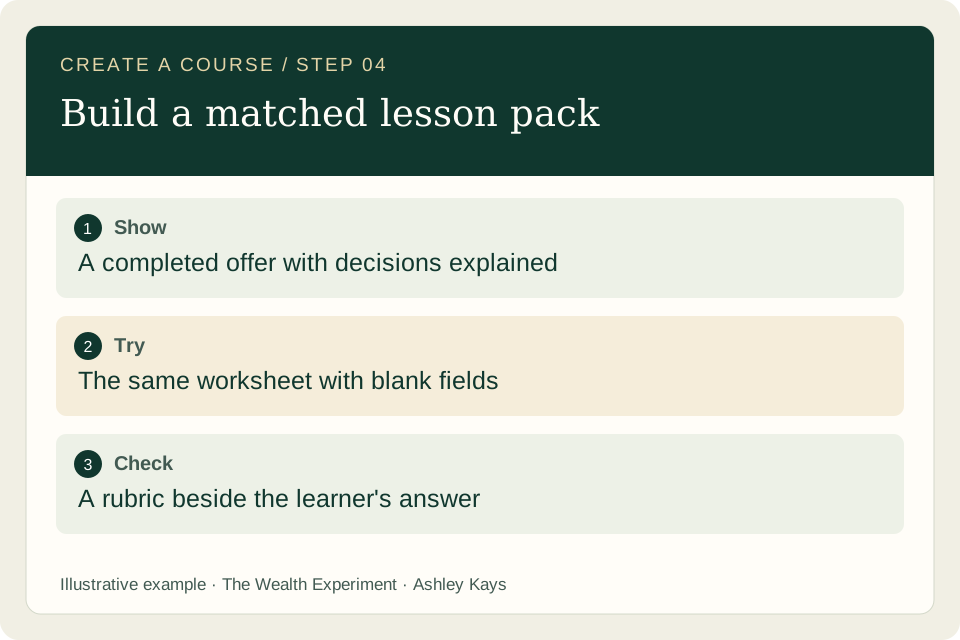
The materials should make it easier to do the task. Build a matched set of instructions, examples, and practice tools so learners do not have to infer how one resource connects to another.
What to do
- Create a completed example and a blank worksheet with identical headings. Include a short instruction and one useful example wherever a field could be misunderstood.
- Make a visual for each important decision. Use real screenshots for an actual interface demonstration, or label original mockups as illustrations. Keep essential instructions in selectable text.
- Review the materials on a phone and in the format you will share. Check reading order, text size, contrast, descriptive links, image alternatives, and transcripts if you record instruction.
See what good work looks like
One worksheet, two views
The completed worksheet has six fields: buyer, observed problem, supporting note, deliverable, exclusions, and next test. Beside it, the blank version uses the same labels and enough space for the learner's answer.
The supporting-note field says, “Quote or summarize the relevant input; write unknown if you have no evidence.” That instruction helps prevent the learner from replacing missing information with an attractive story. A separate prompt card helps organize the notes without supplying invented customer facts.
Copy the prompt for this step
Replace the bracketed details with your own project. Review what the assistant returns.
Create a completed example and a blank worksheet for this storyboard [storyboard]. Use the same headings in both. Add concise field instructions and a rubric checklist. Keep fictional inputs labeled. Review the materials for confusing language, missing context, and content that is only understandable from an image.
Before you move on
- The worksheet matches the taught method.
- Visual information is also available in text.
- Files and links open in their intended format.
Keep this output: A complete lesson pack: explanation, example, worksheet, prompt card, visuals, and rubric.
If you get stuck: More slides do not automatically add value. Prefer one clear example that supports the exercise over several decorative screens.
You + learner-review assistant
Pilot with learners
The first pilot tests whether people can use the lesson. Watch the work they produce and where they hesitate, then revise the explanation or activity responsible for the difficulty.
What to do
- Invite a small group who resemble the intended learner and explain what is ready for testing. Agree on what feedback you will collect; ask separately before recording anyone.
- Let participants attempt the task before explaining it again. Record unclear instructions, missing prerequisites, requests for help, and the difference between assisted and independent work.
- Compare the submitted artifact with the rubric. Ask the learner to explain one decision and try a different input. Prioritize revisions that address observed barriers to completing the task.
See what good work looks like
Turn a difficulty into a specific revision
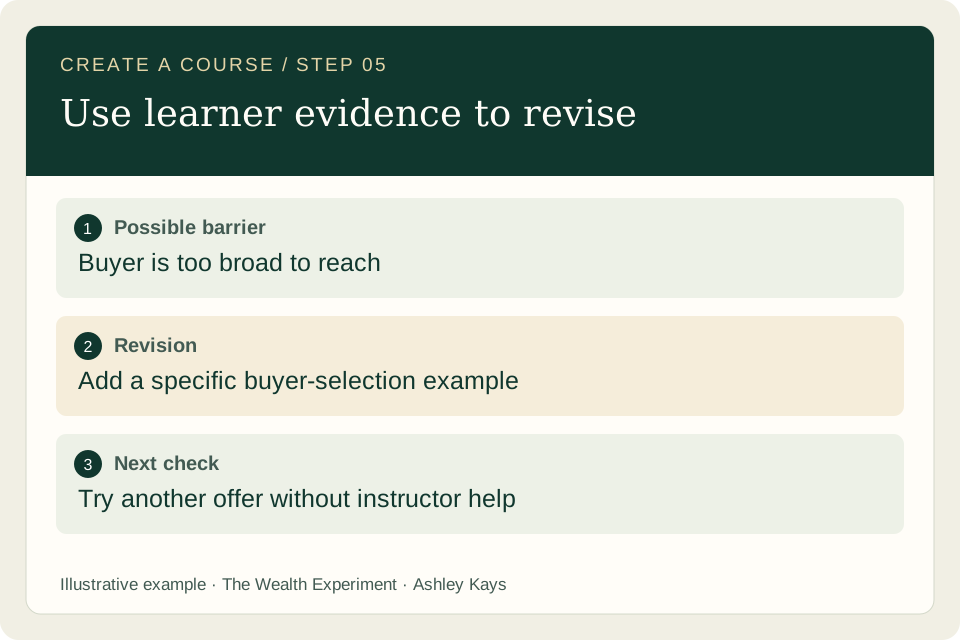
Possible pilot observation: a learner writes “all small businesses” as the buyer and cannot describe how to reach one. This is a hypothetical difficulty to watch for, not a report from a completed pilot.
A useful revision would add a short buyer-selection example and a question about an actual access route. The next attempt should use a different service idea so you can see whether the learner applies the selection process independently.
Copy the prompt for this step
Replace the bracketed details with your own project. Review what the assistant returns.
Review these de-identified pilot observations [notes] against this rubric [rubric]. Separate observed difficulties from interpretations. Recommend specific lesson revisions, explain which evidence supports each, and propose a follow-up task. Preserve whether work was independent or required help. Do not invent learner feedback or results.
Before you move on
- Feedback describes behavior as well as opinions.
- Assisted work is identified accurately.
- Each proposed revision addresses an observed issue.
Keep this output: An observation log, reviewed learner artifacts, and a prioritized revision list.
If you get stuck: Positive comments are useful feedback, but they do not demonstrate the skill. Review the learner's actual work and reasoning.
Publishing assistant + you
Publish and maintain
A finished lesson needs a clear entry point, working materials, and an owner for updates. Publish the version you can support, then expand the course using the lesson quality you have established.
What to do
- Write the lesson page around the learner: outcome, prerequisites, contents, practice instructions, review method, and next step. Explain access and support terms before asking someone to enroll.
- Walk through the public experience as a learner. Open each download, follow the lesson order, try the exercise, and verify any configured request or enrollment path.
- Keep a dated update log with the change, reason, and materials affected. Review demonstrations when tools change and revise dependent worksheets together so the lesson remains consistent.
See what good work looks like
Publish one coherent learning path
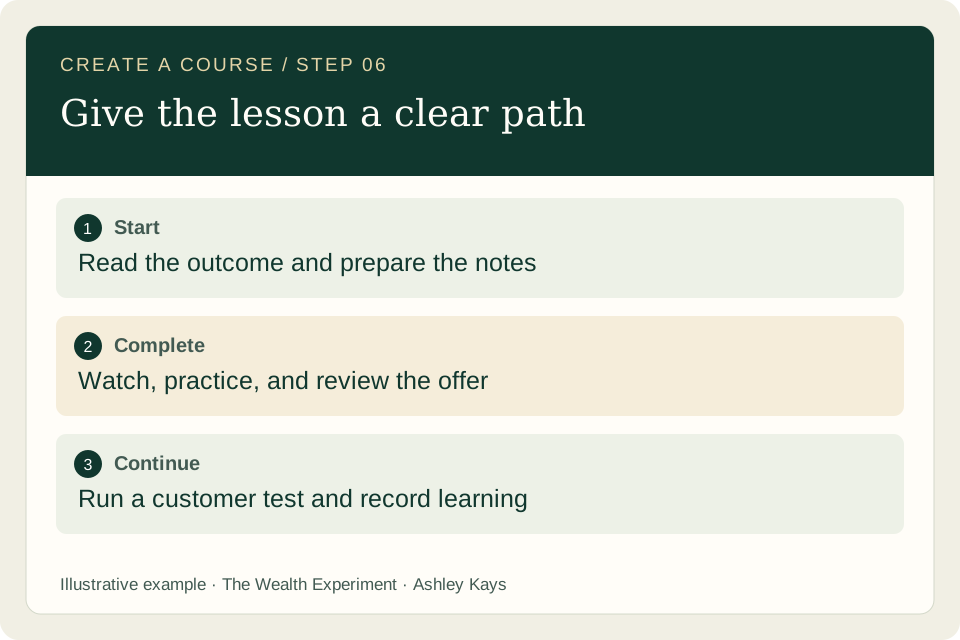
Our example page opens with the task: turn customer notes into a testable offer. It then offers the sample notes, demonstration, blank worksheet, and rubric in the order the learner needs them.
The closing action is to test the offer with a relevant person and record what happens. A related lesson can teach how to interpret that feedback. Describe the current lesson honestly; do not imply a larger course, credential, or live support is included unless it is available.
Copy the prompt for this step
Replace the bracketed details with your own project. Review what the assistant returns.
Review this lesson package [materials] as a first-time learner. Check the promised outcome, prerequisites, navigation, downloads, practice, review instructions, and support description. Return concrete gaps and a publication checklist. Draft an update-log entry using only the changes I provide; do not claim checks you have not performed.
Before you move on
- The page accurately describes what is available.
- Learners can access and complete the materials.
- There is a named next step and update owner.
Keep this output: A published lesson path with verified materials, clear expectations, and an update record.
If you get stuck: Publishing every outline at once multiplies unfinished work. Let a complete, tested lesson set the standard for the next one.
Make it yours
Make one lesson ready for a pilot
Choose a task you know well and build one complete lesson. Replace the example learner, inputs, demonstration, and rubric with material relevant to your expertise.
Keep these deliverables
- A learner brief and observable objective.
- A completed example and a different independent exercise.
- A blank worksheet, review rubric, and accessible visual.
- A pilot invitation plan and a place to record revisions.
You are ready for the next step when…
- A suitable learner can explain the task and locate the materials.
- The exercise produces work that can be reviewed with the rubric.
- You have a concrete plan to observe independent performance.
When the work gets stuck
The curriculum feels large and generic.
Return to one learner task. Ask which sections directly help someone perform it, then move the rest into optional or later material.
Learners can copy the example but cannot adapt it.
Add an independent exercise with a different input. Ask learners to explain the decisions, then revise the demonstration where the reasoning is missing.
The worksheet generates vague answers.
Add a specific instruction, an example, and a review question to the unclear field. Test that field with a fresh input.
A tool screenshot is already outdated.
Check the current interface and official instructions, update the demonstration, and preserve a text explanation of the underlying task.
Questions before you begin?
Do I need a learning platform before I begin?
A shared lesson and accessible worksheet may be enough to pilot the experience. Choose a platform when you know what access, delivery, assessment, or support your learners actually need.
Can the AI write the whole course?
It can help draft the components, but your expertise establishes the method, examples, and quality standard. Review factual claims and observe whether learners can apply the instruction.
When should I add more lessons?
Expand when the first lesson is complete enough to use and you understand its remaining gaps. Choose the next task from learner needs and observed difficulties rather than the size of an AI-generated outline.
Sources and further reading
These references support the workflow and learning principles. The worked examples and prompts above are original teaching material. Check product documentation for current screens and feature availability.
- Carnegie Mellon: align learning objectives, assessment, and instruction ↗
- W3C WAI: choosing appropriate text alternatives for images ↗
- Anthropic: simple workflows, bounded tasks, and evaluation ↗
Guide updated October 25, 2026 · Ashley Kays · The Wealth Experiment